I Built A Serverless Calendar SMS Service On AWS Because I Refuse To Carry A Smartphone
Last Updated 2025-09-21
Yes, it is as ridiculous as it sounds. If you haven't read my article Dumbphones are getting dumber, that's the less technical primer to this post.
If you don't want to read that, the TL;DR is that there are specific pain points that I've encountered since switching to a dumbphone. One I still haven't sufficiently alleviated yet is: integrating my calendar system into my daily workflow without a smartphone.
The Terraform files, Lambda functions and bash script used to run this project are available on a Github repo. It's still very experimental, so use at your own risk.
Anyways, this blog post outlines one approach I took to solve this issue, and although I'm not using it currently, basically due to the price per SMS charged by AWS, I still think it's worth sharing.
Constraints
Teasing out the problem a little more from just 'smartphone bad, but i miss calendar', I figured the solution to integrating my dumbphone with my calendar system would need the following:
- Work with my calendar application of choice (more on this in a minute)
- Be automated; no manual uploads
- Endpoint needs to be SMS (for dumbphone notifications)
- Be a serverless solution, I don't want to have to pay and maintain a server just for this
- Use AWS services
Designing The Initial Architecture
The AWS ecosystem is large, complex, and at times downright confusing. Figuring out what would go at the end of the pipeline was straightforward though, an SMS endpoint screams an SNS topic. Obviously, the main difference to most projects is that my topic would have one subscriber; me!
The design of the pipeline feeding the SNS topic could be more flexible, however. The underlying calendar software would end up guiding this decision.
For a while I've been using my own fork of
Lazyorg to manage my calendar from my
laptop. It's a cool little TUI that is built with gocui. The events are backed
by an SQLite database. To get these events pushed to my dumbphone, I'd need to
build a pipeline that uploads the database, convert the events to a message, and
place the event in the SNS topic.
Working with a small SQLite database lends itself well to using AWS Lambda. Therefore, I settled on a solution that would: upload the SQLite database file to an S3 bucket, and using S3 event notifications, create EventBridge schedules for each of these upcoming events contained in the database. The schedule would call a second Lambda function 15 minutes before a given event that formats the event as a message, and publishes it to an SNS topic, which my mobile phone was subscribed to.
I thought about potentially offloading some of the more complex transformations and parsing to my local machine before uploading, which would potentially remove the need for an S3 bucket, or a secondary Lambda function. However, I thought the following architecture provided the greatest flexibility to alter the design later, as well as provide advanced control over the message content that would be sent over text.
Overview Of Pipeline
Local cronjob -> S3 -> Processing Lambda -> EventBridge -> Notification Lambda -> SNS Topic -> Dumbphone
Implementing Prototype
With the architecture decided, I moved onto implementation. I setup a cronjob to upload my SQLite database once a week to an S3 bucket. This provided a beneficial secondary purpose, it would serve as a weekly backup of my calendar!
I used Claude Code to whip up a quick prototype Lambda function that would trigger on any upload of a file to complete the following:
- Download the
.sqlite3database to the Lambda's/tmpdirectory - Perform an SQL query to grab upcoming events (within the next 7 days)
- Clear any existing EventBridge schedules from previous uploads
- Create new EventBridge schedules that triggers a second Lambda function 15 minutes before an event in my calendar
Fighting Dependencies
Something I wasn't quite happy about, however, was how the underlying dependencies of the project led to suboptimal code being produced for the Lambda sections of the pipeline.
One great example of this is with date parsing. Python has a wonderful
datetime library (especially compared to Go, which I'm using for other
projects), but it felt a little bit awkward integrating the SQL database which
stores the date and times as strings with the inbuilt datetime implementation.
My calendar stored everything as UTC strings, so we had to do the following:
# Calculate time window: now to 7 days in the future
now_utc = datetime.utcnow().strftime('%Y-%m-%d %H:%M:%S')
end_date_utc = (datetime.utcnow() + timedelta(days=7)).strftime('%Y-%m-%d %H:%M:%S')

# Query events within the 7-day window
cursor.execute("""
    SELECT id, name, description, location, time, duration
    FROM events
    WHERE time > ? AND time <= ?
    ORDER BY time
""", (now_utc, end_date_utc))
And then for each event, parsing the strings back into Python datetime
objects:
if '+' in time_str or 'T' in time_str:
    event_time_utc = datetime.fromisoformat(time_str.replace('+00:00', '')).replace(tzinfo=None)
else:
    event_time_utc = datetime.strptime(time_str, '%Y-%m-%d %H:%M:%S')
It certainly felt like I was fighting the data format rather than working with it. Regardless, we pushed on.
Testing The Prototype
Despite some questionable data conversion, the prototype was largely working outside of the inevitable timezone issues you run into when developing anything calendar adjacent. Regardless, I was receiving my calendar notifications 15 minutes before the events occurred, as expected.
This was great, until I stopped receiving notifications for my events about a day or so later...
To debug, I first went through the logs of the first Lambda function's executions. This wasn't it, they were triggering fine. Next, I checked the EventBridge schedules, these were created and were set to trigger at the right time too! I narrowed down the problem to the final Lambda then, or so I thought...
This was working fine too! I was befuddled; the entire pipeline seems to be working, but I'm not getting any messages?!?!
Then I realised something... I wasn't receiving SMS messages from AWS AT ALL! I set up a separate SNS to SMS topic for the purposes of cost monitoring, and these weren't being pushed to my phone either! This was weird, surely my pipeline wasn't affecting other SNS topics I'd set up, right?
Well, turns out, I'd fallen victim to AWS quotas. AWS has a default spending threshold of $1 per account for SMS. I'm sure this helps prevent a significant amount of spam, but I felt a little frustrated that I wasn't even informed upon reaching the quota that the quota even existed!
The funny thing about this prototype, was that the most difficult thing to do was to request an increase on my quota (taking a number of days to be approved). I felt a little silly filling out the form clearly meant for much larger organisations running sophisticated campaigns and programs, requesting a $15 a month spend, and an intended audience of... myself.
Nevertheless, when the quota increase was approved, we were back in business, and receiving SMS messages again.
Reflections On Prototype
Living with the prototype for a while made me reflect on the architecture and decisions I had made, and how it could be improved.
The primary drawback of the prototype was that the calendar was backed by an SQLite database rather than a more standard iCal based system. This means that the Lambda functions I developed felt a little janky, and the entire system to me felt brittle because of it. Also, being a prototype, I hadn't written any tests (iT wOrKs On mY MaChInE).
Really, these problems could have been avoided if I gave less control of the design of the Lambda functions to Claude Code, and took more time teasing out the detailed instructions that it works best with. Instead, I ended up with giant cyclomatic issues, and a spaghetti code that, while working, wasn't worth going back and fixing (looking at you magic numbers and giga-methods).
Another problem with the prototype was that the build wasn't reproducible, I used the AWS console to set everything up, when I should've used CloudFormation or Terraform.
Finally, the S3 cronjob upload method I relied on to trigger the serverless pipeline wasn't particularly reliable; my machine obviously needs to be on when the cronjob is run, which means that if my laptop lid is closed when the cronjob is set to go off, the pipeline wouldn't be set off at all (until I noticed I'm not receiving SMS messages and manually uploaded them to S3).
Moreover, this architecture, specifically this use of S3, meant that it would only ever support one calendar, as each upload overwrites the previous calendar's events. Why? S3 event notifications trigger on every uploaded file, not on every upload batch, preventing uploading multiple calendars simultaneously.
Building V2
Despite the issues in the prototype, I was happy enough with how it was running.
The trigger to create a V2 of this project was actually building Chronos, my
own calendar TUI. I'll be releasing it in the next couple of months. It's backed
by a more standard iCal compliant system. Making the switch to this really
forced my hand, and allowed me to make some major changes to this notification
project.
Architectural Changes
The major design difference compared to the prototype would be with regards to
how we used the S3 bucket. In the prototype, an upload would trigger the Lambda
using S3 event notifications, but since we wanted to support multiple calendars
(with Chronos: multiple .ics files), we would need to automatically trigger
the Lambda function in a different way. Since calendar files are pretty small
(usually measured in kb), we should be able to trigger a Lambda function with
the calendar files as a part of the payload.
I still kept the S3 bucket as a part of the pipeline, however, as I still found it handy to have a second place my calendar is saved to, but, it really isn't needed to process the events, as the Lambda does all of the lifting now.
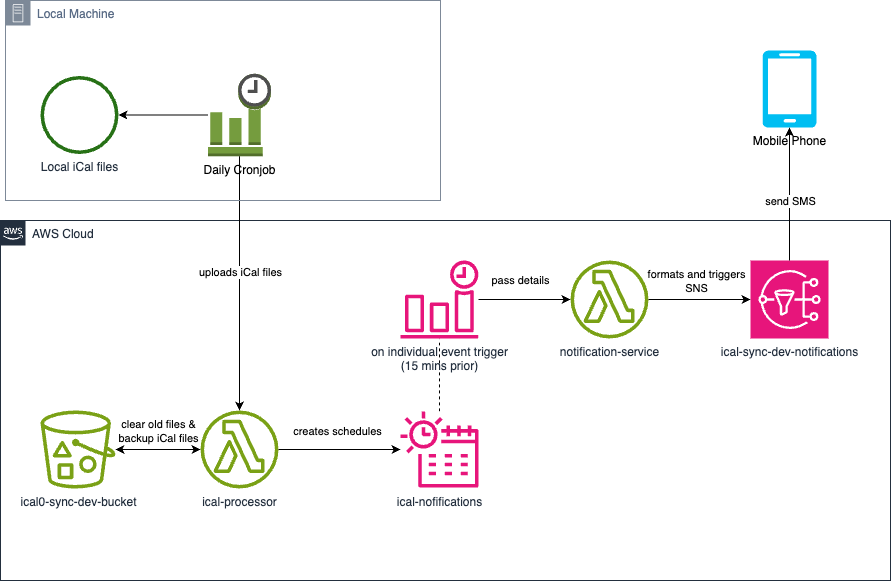
Another massive change is on the reproducibility of the project in V2. Now, we're using Terraform. This simplified the orchestration of the AWS services, and I really LOVE the declarative approach it uses to spinning up and managing running services. Now I've used Terraform for this project, I don't think I'll be using anything else.
One challenge moving to Terraform did present, ended up being very beneficial.
It forced me to use best practices, and to avoid shortcuts. One example of this
was the packaging of the libraries used in the Lambda functions. The recurring
date time functions that expand iCal events into individual objects isn't a part
of the standard datetime library in Python, instead, you would use a
separate library or roll your
own (RIP prototype recurrence generator). Terraform encouraged me to set up a
Lambda Layer rather than just manually package libraries as a part of the Lambda
function itself. It did this by making it dead simple to setup and manage a
Lambda Layer.
Another key difference is the robustness and stability of the software. While I
again used Claude Code to develop the Python Lambda functions, I took the time
to control the design and implementation, using an iterative process to break
down the complex functions into smaller, composable, and most importantly,
testable functions. I used pytest and moto to mock and test the Lambda
functions (I'll be honest, I just vibed the tests, outside of making sure it
focused on timezone handling). Despite this, we still encountered a couple of
bugs... timezones and missing events, a tale as old as time.
Implementation Challenges
One timezone bug (now patched) would occur every time the first Lambda function was triggered. Events that existed in the past (up to 10 hours ago) would immediately be texted to me. Since I'm in UTC+10, it was pretty clear what was going on. Digging a little deeper, it occurred when events had no timezone attached. So, adding a default timezone (Melbourne) seemed to work fine. This is implemented with a conditional check for timezone existence.
Another bug was with regards to EventBridge schedule groups. Rather than iterate
through all existing EventBridge events to delete each one individually, I
decided it would be more elegant to delete the entire EventBridge group. Only
problem was that I wanted to immediately write to this EventBridge group again.
The boto function to delete EventBridge groups operates asynchronously, so I
had to introduce a manual sleep() that gives enough time for AWS to delete the
group before attempting to write to it again, else the Lambda would error out.
If anyone wants to measure the length of time this takes to save on Lambda
compute, be my guest.
A Little Vent On IAM & LLMs
Why do LLMs seem to have a love for poor security practices, particularly when it comes to creating IAM policies? When building V2, it would create policies with permissions that were widely out of scope to the project, and even those that were necessary, would make the permissions far too broad. Several times I found myself reviewing generated policies that would be applied to all of my buckets, or to all of my EventBridge schedules, despite the fact that Claude Code had basically the entire project and previous secure policies from the prototype in it's existing context window.
Caution Before Running
So... You read the title, you got a little excited, you cloned the repo,
modified the Terraform state location variable, added your phone number, and
you're ready to run your own personal SMS calendar solution. Well... at least if
you're in Australia, maybe think twice before jumping in with terraform apply.
The cost per SMS varies widely across different countries, and over here, it ends up being about $0.04 per text. I use a timeblocking methodology to organise my schedule, so I end up with about 10-15 events per day. Over the course of the month, this adds up to about $30AUD, which is more than I spend on my entire mobile plan.
The other major downside/quirk of this system is the deliverer ID. When you get a message, it's not from 'Sam's iCal', but rather 'UNVERIFIED'. Outside of testing prototype systems, it's expected that you end up registering a sender ID and setting up an origination identity, which can be quite a costly and time consuming process. Perhaps the market for rolling your own private SMS notification system might be a little smaller than I initially thought...
However, if you're a dumbphone user flush with cash, and can mentally map 'UNVERIFIED' to 'My Calendar', then check out the repo!
Conclusion & Future
I had a fair bit of fun getting this project up and running. However, it turned out to be an expensive education. Serverless is cheap, and Terraform is awesome, but AWS has more hidden quotas than you can poke a stick at. Most importantly, I proved that you can solve a $0 problem with a $30/month solution smh...
So, at least for now, I won't be using this system to push my calendar to my dumbphone. Having had some more time to reflect on the problem, I think the actual solution would be to use the inbuilt, barely working web browser on my dumbphone.
Perhaps I could setup a really simple webpage that my dumbphone could access, with simple password authentication provided by HTTP Basic Auth, and then secure it by enforcing a HTTPS connection. This would certainly be more flexible, however, the obvious downside is that there wouldn't be notifications. I might have to use my brain every now and again...